Play Drink the Ocean Online
Launch the full HTML5 browser build below in wide 16:9 or fullscreen mode on PC, Mac, Chromebook, Android, and iOS, or switch tabs to open a 1–4 player desktop Co-op lobby on Mana.
Live browser stage
Zero downloads · Instant HTML5 or 1–4P Desktop Co-op
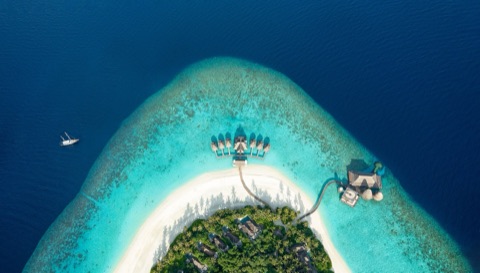
Sip the ocean dry right in your browser
Start on the island shore with a plastic straw, press seawater into Salt, buy Extra Straws, a Mouth Vacuum, and a Pocket Whirlpool, and expose the shipwreck, whale skeleton, sunken city, and ocean plug.
- WASD Move
- Left Click / Hold Drink
- T Go Home to Press
- 1-3 Switch Tools
- E Sky Duck Gifts
- Tab Free Cursor
Play 1–4 Player Co-op on Mana (Desktop Browser)
The Mana edition runs a shared 1–4 player first-person ocean session in desktop browsers (keyboard and mouse). Every teammate’s straw lowers the same global waterline while players sell uncovered seabed treasures for stronger whirlpool gear.
- Platform: Desktop computer browser (Chrome, Edge, Brave, or Firefox with WebGL/WebGPU acceleration; keyboard & mouse required).
- Party size: 1 to 4 players lowering the sea together in real time.
- Fastest split: Keep 2–3 players sipping continuously at the waterline while 1 runner hauls exposed shipwreck treasures to the shop.
Desktop keyboard, mouse & mobile touch controls
Mastering two shortcuts immediately doubles your early Salt rate: hold Left Click (or the mobile DRINK button) continuously at the shoreline, and hit T the instant your belly hits 100% capacity instead of walking uphill back to the island Press.
| PC Key / Input | In-Game Action | Android & iOS Touch Equivalent |
|---|---|---|
W A S D | Walk across the island, shoreline, and exposed seabed | Virtual thumbstick drag |
Mouse | First-person camera look around the basin | Swipe screen to look |
Left Click (hold) | Drink ocean water through active straw or tool | Hold DRINK button |
Space | Jump over coral ledges, shipwreck ribs, and steps | Tap Jump icon |
1 / 2 / 3 | Switch equipped tools (Straw, Mouth Vacuum, Whirlpool) | Tap hotbar tool slot |
T | Teleport straight home to the PRESS and blue SHOP pad | Tap Home icon |
E | Open gifts and boons dropped by the Sky Duck | Tap Duck gift prompt |
P / Tab | Open Settings menu (P) or release mouse lock (Tab) | Tap gear icon |
First five minutes: step-by-step loop
- Walk to the shoreline and hold
Left Clickto fill your starter belly with seawater. - Press
Tas soon as your belly is full, then walk straight under the PRESS pad to squeeze water into Salt. - Step onto the blue SHOP pad to alternate between Extra Straws (faster L/sec) and Bigger Belly (fewer press trips).
- Watch the sky for the Sky Duck and press
Ewhenever gifts arrive to claim temporary flow and Salt boosts. - Switch tools with
1,2,3once you purchase the Mouth Vacuum and Pocket Whirlpool to push down to the shipwreck, whale skeleton, sunken city, and ocean plug.
Desktop mice & Co-op voice headsets
Both the Mana 1–4 player desktop browser edition and the Playgama WebGL edition rely on sustained left-click drinking, quick first-person camera turns, and optional side-button binds for T (Go Home) and E (Sky Duck):
| Gear | Best Use in Drink the Ocean | Hardware Detail | Link |
|---|---|---|---|
| Logitech G305 Lightspeed Wireless Mouse | Wireless first-person camera & hold-to-drink | 99 g wireless, HERO 12K sensor, crisp mechanical left/right tensioning + 2 thumb buttons | View on Amazon |
| Razer DeathAdder Essential Gaming Mouse | Budget wired desktop browser sessions | Ergonomic right-hand shell, 10M-click switches, 2 thumb buttons ideal for T & E | View on Amazon |
| HyperX Cloud III Gaming Headset | 1–4 player Mana Co-op Discord callouts | 10 mm noise-cancelling mic with LED mute indicator and angled 53 mm drivers | View on Amazon |
| Logitech G435 Lightspeed Wireless Headset | Ultralight PC & mobile dual-mode audio | 165 g featherweight frame with Lightspeed USB dongle + Bluetooth for phone runs | View on Amazon |
As an Amazon Associate, this site earns from qualifying purchases.
Common questions
Why does the mouse cursor disappear when I click inside Drink the Ocean?
First-person WebGL games use browser Pointer Lock so moving your mouse rotates the 3D camera continuously without hitting the edge of your monitor. Press Tab (or Esc) at any time to free the mouse cursor.
Does the browser game work on school or work Chromebooks and mobile phones?
Yes. The HTML5 build streams standard WebGL assets over HTTPS with landscape touch controls for Android and iOS phones plus keyboard-and-mouse support on Windows, macOS, Linux, and ChromeOS.
How do I fix lag or low FPS in fullscreen mode?
Enable Hardware Acceleration in Chrome or Edge settings (chrome://settings/system), close background video tabs, and press P inside the game to lower visual effects if you are running on integrated graphics.
How do I switch from solo HTML5 play to 4-player Co-op?
Select the Mana 1–4P Co-op Launch tab at the top of the game stage or open mana.gs/drink-the-ocean on a desktop computer browser with keyboard and mouse.